Having an App Developed: Process, Partner Choice and Checklist 2026
Want to have an app developed but not sure where to start? This guide walks you through the process, the choice between agency, freelancer and offshore, the right briefing and all the questions you should answer before you begin.
BlogHaving an App Developed: Process, Partner Choice and Checklist 2026
You have an idea for an app. Maybe it should digitise a tedious process in your company, maybe it should offer your customers something the competition does not have. The goal is clear. The path to it is not. And that is exactly where the questions begin.
Freelancer, agency or an offshore provider from abroad? A fixed price or agile billing by effort? Do you need a requirements document before anyone writes a single line of code? How long does all of this take, and how do you tell whether a provider knows their craft or is just promising you the moon? Anyone having an app developed for the first time faces a jungle of decisions, and every wrong one can get expensive later.
The good news: all of this is learnable, and you do not have to become a developer for it. In over 10 years of app development we have accompanied projects from small MVPs to company-wide platforms, including for Flaschenpost, CLAAS and DHL. Along the way we keep seeing the same stumbling blocks, and almost all of them can be avoided if you know about them in advance.
This guide takes you by the hand. You will learn when an app is worth it at all, how app development works step by step, how agency, freelancer and offshore really differ, how to find the right agency, and what a briefing looks like that puts your project on track from the start. The goal is not to sell you something, but to put you in a position to make a good decision. Even if you decide against us in the end. Once you are ready to turn your idea into reality, our page on having an app developed shows you how we go about it.
When does it make sense to have an app developed?
The most uncomfortable question first: do you really need an app? Not every problem needs its own app, and a good advisor will tell you that too. A custom app pays off when it improves a clear process, measurably saves you time or money, or offers your customers real added value that does not exist yet.
In practice, there are a few clear signs that an app is the right solution:
You want to digitise a process that today runs on paper, Excel lists or word of mouth, for example order processing in the field or documentation on the production line.
Your employees or customers are on the move and need features that work offline, use the camera, capture locations or send push notifications. This is exactly where a native or cross-platform app plays to its strengths.
You want to bind customers more closely, for instance through a digital service offering, a loyalty programme or a direct communication channel.
You need a competitive edge that standard software cannot deliver, because your process or business model is special.
The other side belongs here just as much. If at its core you only want to display content that rarely changes, a good, mobile-optimised website is often enough. If you need a feature that has long existed as a ready-made SaaS tool, buying is usually smarter than building. And if your users would open the app only once or twice a year, it will rarely make it onto the home screen. A web app in the browser is then the more economical choice.
We mean this seriously: in over 10 years we have more than once advised clients against building an app, because there was a simpler and cheaper solution to their problem. That sounds bad for business, but it is not. Anyone who has been given a no instead of a quote comes back when the next project really does need an app. The rule of thumb: if you can clearly name what concrete benefit the app delivers and how you measure it, then it is worth it. If the answer stays vague, a bit more thinking is worth it before money flows.
The app development process: the 7 phases
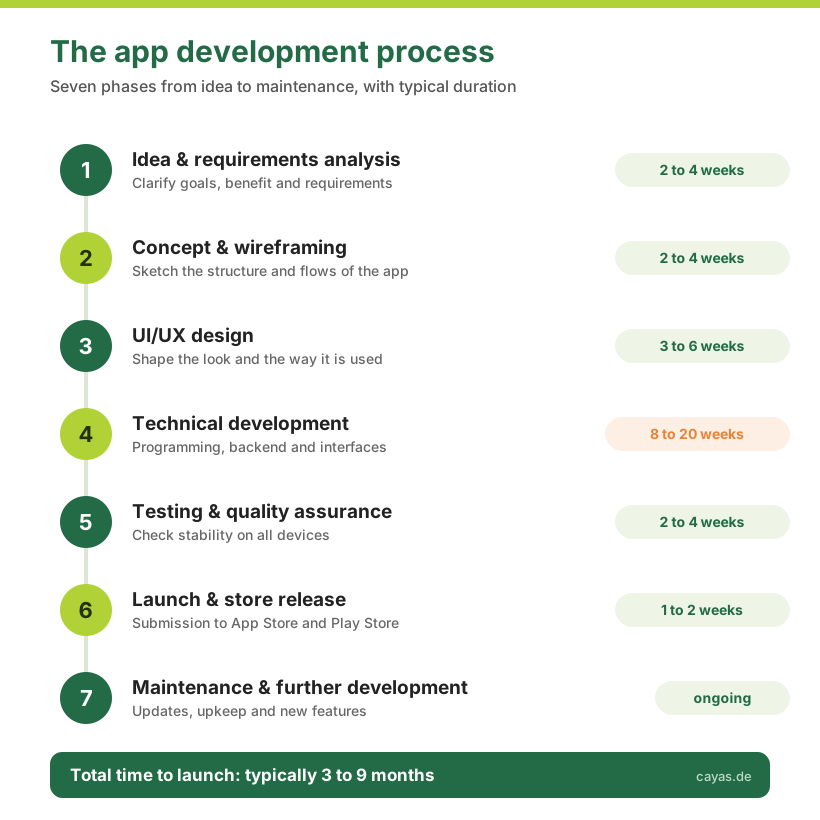
Many imagine app development as one big task at the end of which a finished app appears. In reality it is a structured process of seven phases, and only the middle one is the actual programming. Once you know this process, you can judge any quote better and always know where your project stands.
Phase 1: idea and requirements analysis. At the start there is not code but understanding. What should the app do, for whom, and which problem does it solve? In this phase, an idea turns into concrete requirements. A good partner asks a lot of questions here and sometimes challenges your assumptions too. That is time well spent, because every mistake made here gets expensive later.
Phase 2: concept and wireframing. Now the structure of the app takes shape. Which screens are there, how do they connect, how does the app guide the user from A to B? Wireframes are simple sketches of the screens, still without design but with clear logic. Here you see for the first time how your app will feel, and you can change cheaply what does not fit yet.
Phase 3: UI/UX design. The sketches become the finished look: colours, fonts, imagery, animations. Good design is not just optics, it decides whether your users enjoy the app and use it intuitively. How much rides on this we show you on our page about app design and UX. A technically perfect app that is cumbersome to operate still will not be used.
Phase 4: technical development. Now the programming happens, usually in several increments so you regularly see interim results. This is also where the fundamental technical decision falls: native development for iOS and Android separately, or jointly via cross-platform with .NET MAUI. In parallel, the backend in the cloud often takes shape, managing the data and connecting other systems. This phase is the longest and most cost-intensive.
Phase 5: testing and quality assurance. Before anything goes live, it gets tested, on different devices, in different situations and against the most common sources of error. This phase is easily underestimated, but it is the difference between an app that runs reliably and one your users delete after the first crash.
Phase 6: launch and store release. The app is submitted to the Apple App Store and the Google Play Store. That sounds simple but has its pitfalls: Apple and Google review every app, and rejections over small details cost time. An experienced partner knows the guidelines and gets your app through without unnecessary loops.
Phase 7: maintenance and further development. With the launch the project is not over, it has only just begun. Operating systems are updated every year, libraries age, and your users supply ideas for improvements. Plan for budget here permanently, usually 15 to 20 percent of the development cost per year.
How long does all this take? The total duration is typically between 3 and 9 months, longer depending on complexity. A focused MVP can be done in 3 to 5 months, a mid-complexity business app in 6 to 9 months, a large enterprise app with many interfaces accordingly longer.
Agency, freelancer or offshore: what fits you?
Who builds your app is one of the most consequential decisions in the whole project, and it concerns not just the price but above all the risk. There are four common models, and each has its place. Let us look at where each one reaches its limits.
Model
Typical cost
Strengths
What to watch out for
Freelancer
low to mid hourly rate
cheap, flexible, direct line to the person
single point of failure, rarely design, development and testing from one source
Agency
100 to 150 € per hour
a well-rehearsed team, all disciplines under one roof, cover secured
higher day rate, pays off from mid-size projects
Offshore
very low hourly rate
cheapest on paper
time zone, language barrier, high coordination effort, often rework
In-house team
high running fixed costs
full control, knowledge stays in the company
expensive to build, hard to staff and keep long-term
Build it yourself (no-code/AI)
internal time only
fast and no external budget, good for prototypes
for business-critical apps, nobody is liable for outages, data protection and errors
Now the assessment, model by model.
A freelancer is a very good choice for a first small version or a clearly bounded part. You get low hourly rates and a direct line. The problem is the single point of failure: if that one person drops out, gets ill or leaves, your whole project stalls. And few freelancers cover concept, design, development, backend and testing equally well. For an app meant to carry important processes in your company, that is a risk.
An agency bundles all these disciplines in a well-rehearsed team and secures cover. You pay a higher day rate for it, but you get reliability, experience from many projects and a contact who keeps the big picture in view. We are an agency ourselves, so of course we say agencies make sense. But we say just as clearly: for a 5,000-euro project, an agency is over-dimensioned. You are better served by a good freelancer there.
Offshore providers lure with hourly rates that seem unbeatable. On paper. In practice, time zones, language barriers, high coordination effort and quality fluctuations often eat up the price advantage again. It can work if you have an experienced technical team of your own that steers and checks the work closely. Anyone who does not have that often pays the low hourly rate twice in the end: once to the offshore provider and once to whoever does the rework.
An in-house team only pays off if you develop software permanently and at scale. Good app developers are expensive and hard to find, and a single project rarely justifies the running fixed costs.
And what about building it yourself, with a no-code builder or AI? Almost everyone rightly asks this today. For a quick prototype or a small internal tool, that can be exactly the right route. But as soon as the app becomes business-critical, meaning it carries processes, handles customer data or faces the outside world, the decisive question shifts. It is no longer "what does building cost?" but "what does an outage cost, and who is liable then?" Since the revised EU product liability rules, software falls under this liability too. An AI produces code, but it takes no responsibility. If your app triggers a wrong order, loses data or breaches data protection, no language model stands behind it. That is exactly the core of what you pay an agency for: not just the code, but someone who is responsible for the result and stands behind it.
In practice, most mid-sized companies opt for an agency and bring in external specialists in a targeted way when needed. That is exactly what our Expert-as-a-Service model is for, letting you flexibly add missing know-how without having to build a whole team. Which model fits you depends in the end on project size, risk appetite and your own resources. How we work as a full-service agency, and which services from idea to store are part of it, you can read on our page about having an app developed.
How to find the right app agency: the checklist
Let us say you have decided to work with an agency. How do you now separate the wheat from the chaff? You should ask every provider the following ten questions. The answers tell you more than any glossy presentation.
Can you show me comparable projects? A reputable agency has a portfolio and names concrete examples on request.
Who exactly works on my project, and how is the team set up? You want to know who does the work, not just who sells it.
How do you handle changes during the project? Requirements always change. What matters is how confidently the partner deals with it.
What does your communication look like, and how often do I see interim results? Regular updates, including about problems, are a good sign.
Who owns the source code in the end? The answer should be unambiguous: you.
Which technology do you recommend for my project and why? Watch whether the reasoning fits your project or only the agency's favourite technology.
What does maintenance cost after launch? Anyone who dodges this either has no view of the running costs or is hiding them.
How do you handle data protection and security? In a B2B context especially, GDPR compliance is not a nice-to-have.
What happens if the project gets more expensive than planned? The answer shows you how transparently the partner calculates.
How does the cooperation end if we part ways? A fair partner does not make you dependent on them.
Just as important as the right answers are the warning signs. Here are the red flags that should make you sit up:
A fixed price is promised before anyone even knows your requirements precisely. Serious prices only emerge after a close look at the project.
All your wishes are agreed to without hesitation and immediately. A good partner sometimes advises you against a feature.
There are no presentable references, or only vague hints.
Communication is already sluggish or unclear before the project starts. That does not get better during the project.
The price is conspicuously far below all other offers. That is rarely a gift, more often a hint at hidden compromises.
You recognise a good portfolio by the fact that it shows real, traceable projects, ideally from your industry or with similar complexity. Pay attention to certifications and partnerships too. We are a Microsoft partner, for example, and come from the Xamarin world, the predecessor of .NET MAUI. Such proof shows that an agency demonstrably masters its craft. How differently successful app projects can look you can see in our reference projects, including apps for Flaschenpost and CLAAS.
Our most important tip to close this section: do not commission the entire project right away. Start with a compact first conversation or a paid concept workshop. That way you get to know the partner before you commit for months, and both sides notice early whether the cooperation fits.
Not sure your idea is viable?
In a free initial consultation we look at your app idea together, sort out the open questions and tell you whether and how it can be realised. No obligation and no sales pressure.
The app briefing: how to define your project properly
Now comes the most important section of this whole guide, even if it looks unremarkable. In our experience, app projects almost never fail on the technology. They fail at the start, on the briefing. An unclear briefing leads to wrong assumptions, wrong assumptions lead to wrong features, and in the end there is an app that works but does not solve what it was meant to. A good briefing is the foundation on which everything else stands.
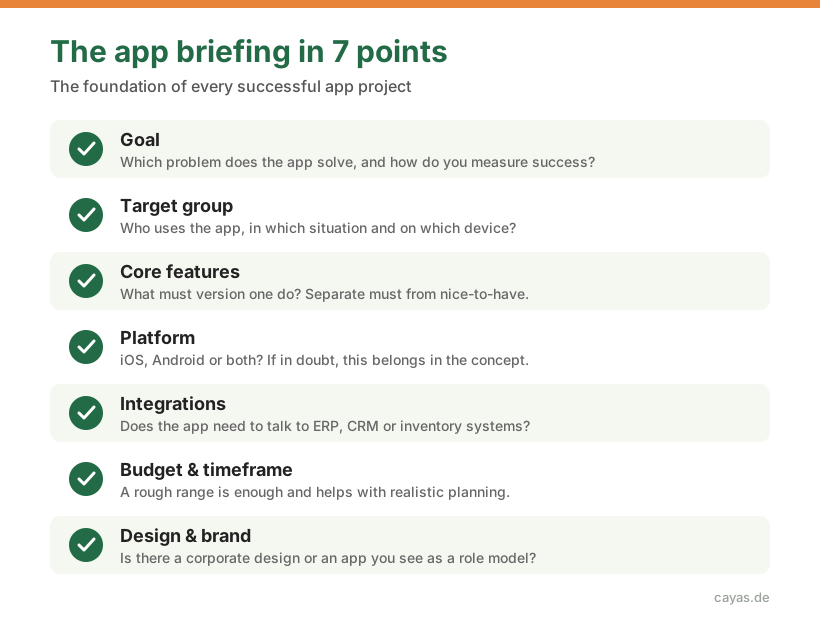
The good news: a good briefing is not a thick technical document. It answers a few clear questions. Here is the mini template we hand our clients:
Goal: which problem does the app solve, and how do you measure whether it is successful? One sentence that nails this is worth gold.
Target group: who uses the app, in which situation and on which device? A service technician out at the machine has very different needs from a customer on the sofa.
Core features: what must the app be able to do in the first version? Draw a hard line between must and nice-to-have. This one distinction often saves you five-figure sums.
Platform: iOS, Android or both? If you do not know, that is fine, then the decision belongs in the concept.
Integrations: does the app need to talk to existing systems, such as an ERP, a CRM or inventory management? Interfaces are a big cost driver, so they belong on the table early.
Budget and timeframe: a rough range is enough. It helps the agency propose a realistic rather than an arbitrary solution.
Design and brand: is there a corporate design, role models or apps you like? That too saves rounds of coordination.
The most common briefing mistakes we see again and again, and they are easy to avoid. The biggest is the wish to cover everything in the first version. That drives cost and risk up and delays the start. The second mistake is hiding the budget in the hope of a cheaper offer. The opposite happens: without a frame, nobody can plan sensibly. The third mistake is describing solutions instead of problems. Do not say from the outset which button you want where, but what the user should achieve. The best way there you find together.
And do not worry: you do not have to perfect this briefing alone. A good partner helps you sharpen it. The only thing that matters is that you go into the conversation with clear goals, not with finished technical specifications.
Costs and budget: what to plan for
The cost question deserves its own detailed guide, so here are only the key figures so you can plan roughly. A simple app or an MVP for one platform in Germany usually lies between 15,000 and 40,000 €. A mid-complexity business app moves between 40,000 and 100,000 €, a large enterprise app with a backend and interfaces starts at around 80,000 € and can be well above that.
What many forget: on top of development come running costs. For maintenance and further development you should plan for about 15 to 20 percent of the development cost per year, plus server and store fees. Anyone who factors this in from the start gets no nasty surprises later.
How exactly these figures break down, which hidden items are missing from almost every quote and how to plan your budget realistically, we have written up in detail in our cost guide. For a quick overview of the price ranges, a look at our page on the costs of app development is worth it too.
One question almost always comes up around the budget: fixed price or billing by effort? With a fixed price you agree a clearly defined scope for a set price. That gives planning certainty but requires a very precise concept, because every later change has to be renegotiated. With time and material you pay by actual effort. That is more flexible when requirements are still evolving, but it demands trust and close coordination. In practice, a mix often works best: a fixed price for a clearly defined first version, then flexible billing for further development. That way you get certainty at the start and agility as you grow.
iOS, Android or cross-platform: the platform decision
One of the first technical questions is: on which devices should your app run? The answer depends on who you want to reach. In a B2B context and with internal apps, the devices in use are often clearly specified. For consumer apps you usually want to reach both worlds, so iOS and Android.
That raises the next question: two separate native apps or one shared cross-platform solution? With native development, a separate app is built for each platform, once for iOS in Swift and once for Android in Kotlin. The result is technically first-class but means two code bases, two teams and nearly double the effort.
With cross-platform development using .NET MAUI a single shared code base serves both systems. The real advantage is not the price but the consistency: one code base, one responsible team and identical behaviour on iOS and Android, with far fewer places where things can drift apart over the years. From our practice as a former Xamarin Premier Partner and today's .NET MAUI expert, this is the more robust and more maintainable route for the large majority of business and process apps. That a shared code base also makes development and maintenance cheaper is a welcome side effect, but not the reason we recommend it. You can read more on our page about cross-platform development with .NET MAUI.
Does that mean native development is obsolete? No. If your app relies heavily on platform-specific features, such as elaborate 3D graphics, hardware-near sensors or a game with the highest performance demands, native development can be the better choice. Which route fits your project is best clarified in the concept, because the platform decision is always a trade-off between reach, budget and technical requirements.
Conclusion: your next step
Let us sum up. An app is worth it when it improves a clear process or creates real added value, and not because everyone happens to have an app. The path there runs through seven phases, from idea to maintenance, and takes 3 to 9 months depending on scope. Whether agency, freelancer or offshore is the right choice depends on project size and risk, with an agency usually offering the most reliable solution for important business apps. You recognise the right agency by real references, communication you can follow and the fact that it sometimes contradicts you. And the foundation for all of this is a clear briefing that describes goals rather than finished solutions.
If you take these points to heart, you have already left the most common and most expensive mistakes behind before they happen. The most important next step is now not a big one: talk to someone who has done this often. In a free initial consultation we look at your idea together, assess it by effort and risk and tell you which route is right for you. Even if that means in the end that you do not need an app at all.
And once you are ready to turn your idea into reality, our page shows you exactly how we accompany you in having your app developed, from the first sketch to the app store.
Ready to turn your app idea into reality?
From the first idea to the app store, our team guides you through every one of the seven phases, advised in a way you can follow and transparently planned. Let us find out together what the right route is for you.
An MVP with the most important features is usually usable within 3 to 5 months. A mid-complexity business app takes 6 to 9 months, and a large enterprise app with a backend and interfaces 9 to 18 months. The timeline mainly depends on the feature set, the number of platforms and the connected systems.
You do not need a finished requirements document or any technical knowledge. What you need is a clear goal: which problem should the app solve, who is it for and how do you measure success? Those answers, a rough budget range and an idea of the timeframe are enough for a first conversation with an agency. You work out the rest together.
Yes, and that is exactly what we recommend to most clients. An MVP (minimum viable product) covers only the most important features, goes live early and delivers real user feedback. On that basis you develop further in a targeted way, instead of spending money up front on features that maybe nobody needs.
A native app is developed separately for each platform, once for iOS and once for Android. A cross-platform app uses a shared code base for both systems, for example with .NET MAUI. The main advantage is a consistent app from a single source with only one code base to maintain; that it also saves cost is a welcome side effect. Native mainly pays off for highly graphics-heavy or hardware-near apps.
Before you invest, check three things: is there a real problem that occurs often enough? Are the people who have it willing to use or pay for an app? And is an app really the best solution for it? The safest way to find out is an MVP that you test early with real users, instead of perfecting the idea at your desk for months.
It starts with a no-obligation first conversation where you clarify the idea, goal and scope. Then come concept and design, followed by development in several increments with regular interim results, then testing and launch. Good agencies work in short cycles and show you early results so you can adjust at any time.
No. A good briefing with goal, target group, desired core features, platform, budget and timeframe matters more than a thick requirements document. You best work out the exact feature set together with the agency during the concept phase. A specification set in stone too early often makes the project unnecessarily rigid and expensive.
After the launch, operation begins. Operating systems are updated every year, libraries age and your users ask for new features. Plan for about 15 to 20 percent of the development cost per year for maintenance and further development. An app is not a one-off project but a product that grows with your company.
Sebastian Seidel
As a mobile enthusiast and managing director of Cayas Software GmbH, it is very important to me to support my team and our customers in discovering new potential and growing together. Here I mainly write about the development of Android and iOS apps with Xamarin and .NET MAUI.
Buy a finished product or build your own software? This guide compares both routes against the criteria that matter in mid-sized companies: process fit, integration, data ownership, version upgrades and total cost over five years. With a decision checklist and a worked example.
Flutter or React Native? Most comparisons stop at two frameworks and leave out the third strong option. This guide compares Flutter, React Native and .NET MAUI against the criteria that actually matter to decision makers: cost, maintainability, team availability and long-term viability.
What does an app cost? This budget guide explains the cost factors, shows documented price ranges from over 10 years of agency practice and helps you plan your budget realistically.