Custom Software vs. Off-the-Shelf: What Pays Off When?
Buy a finished product or build your own software? This guide compares both routes against the criteria that matter in mid-sized companies: process fit, integration, data ownership, version upgrades and total cost over five years. With a decision checklist and a worked example.
BlogCustom Software vs. Off-the-Shelf: What Pays Off When?
“Custom software, or an off-the-shelf product after all?” We get asked this in nearly every first conversation about a new business application. It is a fair question, because budget, timeline and how adaptable your operation will still be in five years all hang on it. It is usually framed too broadly, though. You are not deciding this for your company, you are deciding it for a single process, and for the next one the answer may well be different.
In over twelve years of project work we keep running into the same situation: an off-the-shelf product covers most of a workflow, and the team holds the rest together with spreadsheets, secondary systems and verbal agreements. At some point nobody can say where the reliable numbers live. That is when a software question turns into a business question.
This guide gives you the criteria we use to make that decision in projects. You get a comparison of both routes, the advantages and the limits of custom software, eight questions to work through and a five-year cost calculation in which the finished product wins at one point. By the end you should be able to decide for your own case, even if the decision goes against building your own. Who we are and how we work is on the page about the team behind cayas.
What is custom software?
Custom software is software built for one specific company and one specific use case. It maps an existing workflow instead of prescribing a generic one. Unlike a licensed product there is no second customer whose requirements also have to be accommodated, and no roadmap where your request competes against everyone else's.
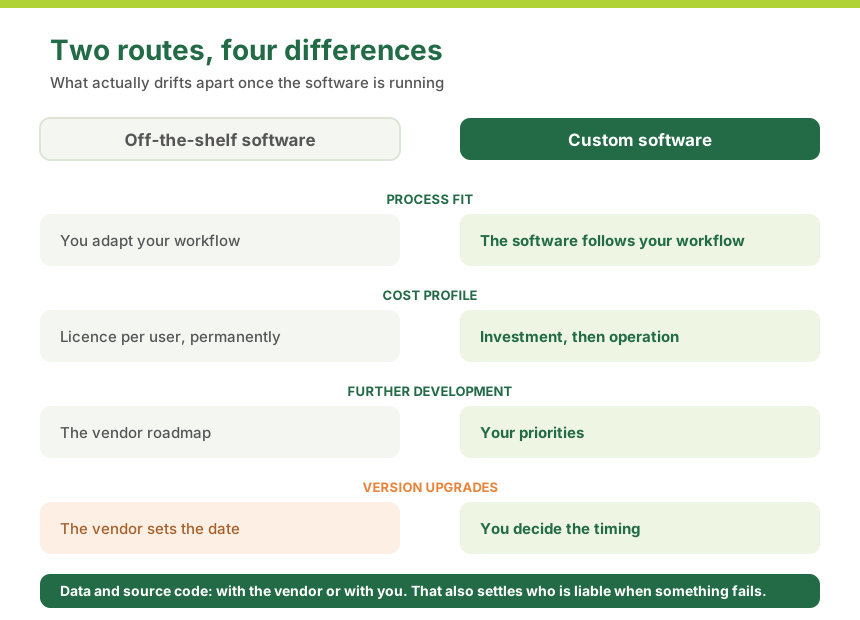
With off-the-shelf software you adapt your company to the software. With custom software the software adapts to your company. Costs, time to launch and the question of who ends up owning the data all follow from that difference.
Custom software, off-the-shelf software and customisation: three terms that get mixed up
Three things regularly get conflated in these conversations, and they are very different technically and commercially:
Off-the-shelf software is a finished product for many customers, such as an ERP system, an inventory management system or a CRM. You pay licence fees, usually per user and month. The vendor decides the feature set and the development path.
Customisation means adapting a finished product within the limits the vendor allows: fields, forms, workflows, sometimes your own scripts. For many cases that is enough. The catch is that every deep customisation has to be revisited at the next major version, and eventually you are paying licence fees for a product whose most important parts you rebuilt yourself.
Custom software is built from the ground up for your case. There is no licence fee per user, instead there is a development investment and ongoing cost for operation and further development.
Typical areas in mid-sized B2B companies are line-of-business applications for a core process, applications that connect several existing systems, analysis and control interfaces for production data, and mobile business apps for people who do not work at a desk, so in the warehouse, in the field, in the workshop or in care. That is exactly where the gap between what a finished product anticipates and what daily work demands is widest.
Custom software vs. off-the-shelf software: the direct comparison
The usual comparison puts purchase price against purchase price, which gets the question wrong from the start. The interesting criteria are the ones that only surface once the software is running. The table below sums up what actually makes the difference in our projects.
Criterion
Off-the-shelf software
Custom software
Process fit
Your workflow follows the product
The software maps your workflow
Time to market
Weeks until rollout
First usable section in months
Cost profile
Low start, permanent licence per user
Higher investment, then operation instead of licence
Scaling
More users mean linearly more cost
More users cost almost nothing extra
Integration
Only through the interfaces the vendor provides
Interfaces are built as needed
Further development
Follows the vendor roadmap
Follows your priorities
Version upgrades
The vendor sets the date, you carry your customisations across
You decide timing and scope, platform moves stay mandatory
Data ownership
Data sits with the vendor, export often limited
Data and source code sit with you
Dependency
Switching is costly, processes hang on the product
Any team can take over if documentation is sound
Competitive edge
No head start, your competitors buy the same product
Possible, because your way of working is in the product
Responsibility for outages
Per licence terms, usually tightly capped
Agreed contractually with your development partner
Two rows of this table are routinely underestimated. The first is scaling. Licence costs grow with the number of users, while the value rarely grows at the same pace. If you pay for 40 licences today and 90 in three years, the cost block has more than doubled without the software gaining a single new capability. With custom software the 90th user costs practically nothing extra.
The second is integration. Hardly any application stands alone these days. It has to talk to the ERP system, to time tracking, to the shop, often to a machine or a handheld scanner as well. Finished products offer exactly the interfaces the vendor planned for. If the one you need is missing, all that remains is the detour through exports, manual handovers and stopgaps. Custom development builds the interfaces and APIs your case requires, and in both directions.
The advantages of custom software
In brochures the advantages of custom software all sound the same. So here are only the ones that actually prove to be advantages in projects, each with the moment you notice them.
1. The software follows your process, not the other way round. This is the real reason behind any in-house build. If your picking process, your inspection workflow or your scheduling works differently from your competitors', then that difference is your edge. A finished product would force you to give it up in order to fit someone else's scheme.
2. No paying for features nobody uses. Large finished products carry decades of accumulated functionality. You pay for all of it and typically use a fraction. Custom software contains what is needed, which makes it easier to operate as a side effect. A reduced, clear screen prevents mistakes in daily work. Why well-considered UI and UX design saves money in operation is a chapter of its own.
3. Integration into your existing landscape. Custom software is built around your systems rather than against them. It can take over data from the legacy system, write results back into the ERP system and use exactly the fields that are correct in your business.
4. It grows with you, including in directions nobody planned. Applications are almost never used exactly the way the concept described. A user group appears that nobody had in mind, data volumes multiply, a workflow shifts. Jumps like these happen in every long-running project. Whether they turn into a few weeks of optimisation work or a ticket with the vendor comes down to who has access to the architecture and the source code.
5. Ownership of source code and data. You hold the usage rights to the source code, the repositories, the build pipelines and the documentation. Legally that is a formality, practically it is your negotiating position: you can change provider without losing the software. With a licensed product you never change only the provider, you always change the entire system.
6. Auditability and data protection. If you work in a regulated industry, in care, in medical technology, in finance, auditability often counts for more than the feature list. Who changed which value and when, where is the data held, for how long? Custom software can bring these requirements with it from the start instead of bolting them onto a product that was never designed for them.
Not sure whether your case qualifies?
Send us two sentences about the process that is currently causing friction. We will tell you whether building your own is worth it or whether a finished product is the faster route. No obligation, no sales pressure.
The limits of custom software: what rarely gets mentioned
Agency articles tend to stop here. We think that is the wrong call, because the following points come up in every project, and knowing them in advance makes them easier to handle.
The responsibility stays with you. With a finished product the vendor takes care of making the software work with the new operating system version, paid for through your maintenance fee. With your own solution that is your topic, together with your development partner. Budget for it permanently: in our projects 15 to 20 percent of the development cost per year for operation and further development is a realistic range.
You need someone in-house who engages with the content. Custom software grows out of your knowledge about your process. If nobody has time to answer questions, review interim results and make decisions, the outcome becomes arbitrary. That person does not have to be technical, but they do have to know the process and be allowed to decide.
The first benefit arrives later. A purchased solution can be running in three weeks. With your own application, months pass before the first productive use. Good projects soften this by delivering in increments and putting a usable section into daily work early, but the difference remains.
Documentation decides how independent you are. The sentence “you own the source code” is worthless if nobody outside the original team can work with it. Insist on readable architecture, automated tests and documented interfaces from day one. Otherwise you own the code while still only one team can actually work on it.
Not every process deserves its own software. If a task comes up ten times a year and is well served by a spreadsheet, leave it in the spreadsheet.
When off-the-shelf software is the better choice
We regularly advise against building your own, and that is not false modesty. The most common reason is the simplest one: your process matches the market standard. Accounting, payroll, time tracking and classic document management work similarly across industries and have been mature in finished products for decades. Building something of your own here costs money without creating value. The same applies when a proven niche product exists for your industry. Such products hold many years of domain knowledge including regulatory requirements that get updated annually, and programming against that is rarely economical.
Two further situations argue against building your own, even when the process would be distinctive enough. If the workflow is changing fundamentally right now and nobody knows what it will look like in a year, it does not belong in software yet. And if the budget does not cover a viable first stage, a half-finished in-house build gets more expensive than any licence, because it creates operational cost without delivering value. In that case you are better off starting with a finished product and adding the custom part later.
That leaves the case that is least often said out loud: it concerns a side function and not your value creation. Custom development belongs where you earn money, not where you merely administrate. A good rule of thumb: everything your competitors do the same way, you buy. Everything that sets you apart from them, you build.
Combining both: the pragmatic middle ground
In most companies both end up side by side: the finished product stays for everything that works the same everywhere, custom development covers only the part that defines your operation, and the two are connected through defined interfaces.
We see two cuts most often. The first puts your own interface in front of an existing standard system: the purchased system stays the system of record and holds the data, and in front of it sits an application that maps exactly the process the product handles too awkwardly. The second extends the standard system with a part it never covered, for example a mobile application for the warehouse, the field service or the workshop that talks to the existing system through interfaces.
Both variants share the same benefit: you can start small. You are not replacing a system landscape, you spend custom budget only where it returns something, and for the standard tasks you keep the advantages of a product somebody else maintains. Extensions that would be a feature request to a product management team that does not know your business are a matter of days on your side of the interface.
When does building your own pay off? The checklist in eight questions
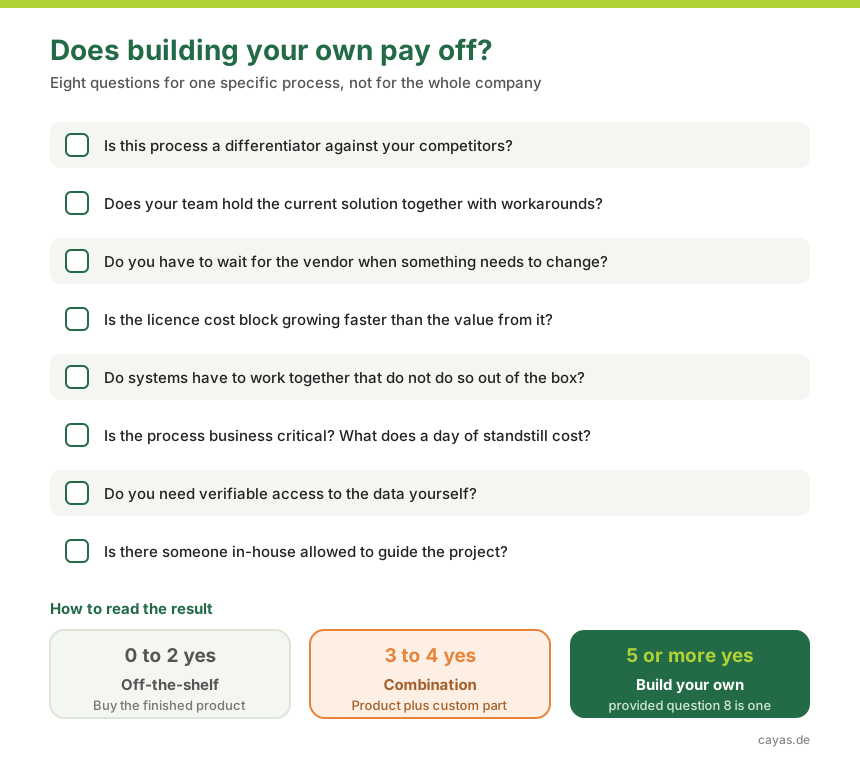
These are the eight questions we ask in first conversations. Answer them for the specific process you have in mind, not for your company as a whole.
Is this process a differentiator against your competitors? If yes, a lot speaks for your own solution. If it is interchangeable, very little does.
Does your team hold the current solution together with workarounds? Spreadsheets next to the system, duplicate data entry, reminders by chat, one person who knows how it really works: those are the usual signs.
Do you have to wait for the vendor when something needs to change? If a small change takes months or a special approval, you are already paying a price that never shows up on an invoice.
Is the licence cost block growing faster than the value you get from it? Project the licence cost over the next five years using the user count you expect then, not today's.
Do systems have to work together that do not do so out of the box? The more data handovers run manually today, the bigger the lever of your own solution.
Is the process business critical? Put differently: what does a day of standstill cost? If that figure is in the region of a development investment, it changes the calculation fundamentally.
Do you need verifiable access to the data yourself? Audit obligations, data protection requirements or customer contracts can settle this question on their own.
Do you have someone who can and may guide the project on the business side? Without that person every software project becomes arbitrary, regardless of the provider.
How to read the result: with zero to two clear yes answers, stay with off-the-shelf software. With three to four, the middle ground from the previous section is worth it, so a finished product plus a custom addition. From five clear yes answers onward, your own solution for this process is usually the more economical decision, provided question eight is among them.
What does custom software really cost? The five-year calculation
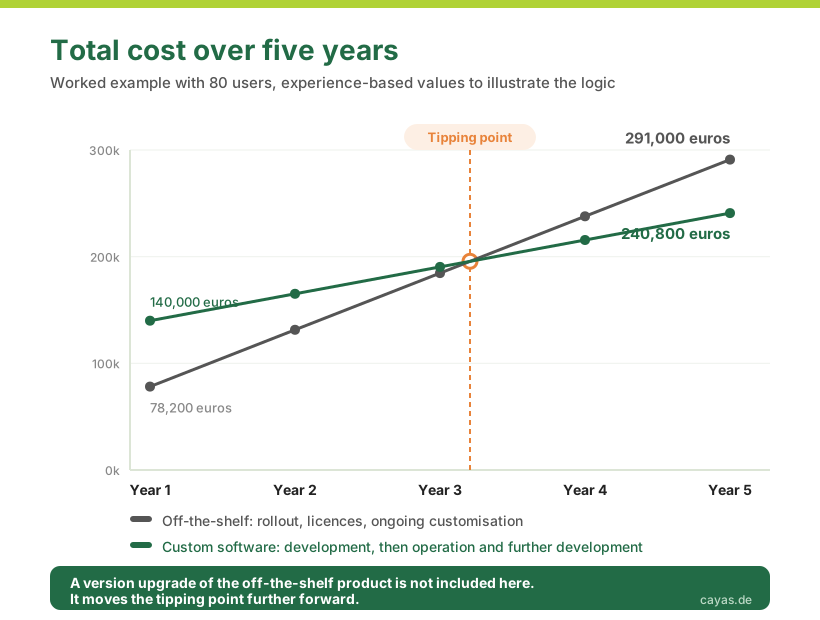
The purchase price is the least important part of this decision, because it is the only one that occurs once. What tells you something is the total cost over a realistic period of use, usually five years. The two routes have completely different cost profiles: off-the-shelf software starts flat and rises linearly with every user. Custom software starts high and flattens out afterwards.
Here is a worked example of the kind we see often, with 80 regular users and a mid-complexity business application. The figures are experience-based values to illustrate the logic, not a quote:
Cost block
Off-the-shelf software
Custom software
Rollout or development
25,000 euros
140,000 euros
Licences (80 users, 45 euros per month)
43,200 euros per year
not applicable
Operation and further development
10,000 euros per year for customisation and interfaces
25,200 euros per year (18 percent)
Total after 3 years
184,600 euros
190,400 euros
Total after 5 years
291,000 euros
240,800 euros
Three things can be read from this. First, the tipping point in this example sits between the third and the fourth year. Calculate over two years and you will inevitably conclude that off-the-shelf is cheaper, calculate over ten and you will inevitably conclude the opposite. The time frame is part of the answer.
Second, everything hinges on the user count. Change the example to 15 users and the licence cost drops to 8,100 euros per year. Then the finished product wins clearly over five years, and quite rightly so. User numbers are the strongest single lever in this calculation, followed by how much customisation the finished product needs each year.
Third, tables like this leave out the costs nobody books: the working time spent on workarounds, the errors from maintaining data twice, the delay when a market requirement can only be implemented after the next vendor release. In our projects this block is regularly larger than the difference in the table above. If eight employees each spend half an hour a day transferring and correcting data, that adds up to roughly 1,000 working hours a year.
The item that appears in no quote: the version upgrade
There is no version upgrade in the table above, and that is where most calculations turn out to be too optimistic. With off-the-shelf software you pay a maintenance share alongside the licence, depending on the vendor around 15 to 22 percent of the licence value per year. That share only keeps you on the versions the vendor still maintains. Once they set an end-of-support date for your version, you choose between upgrading and running a system without security updates.
This upgrade behaves like a project of its own. Data has to be migrated, the entire workflow has to be tested again, staff need an introduction to changed screens, and more often than not the requirements for operating system, database or hardware rise along with it. It gets expensive above all where you adapted the product to your business: every one of those adaptations and every third-party add-on has to be checked and frequently rebuilt. The better the product was tailored to your process, the more effort the jump takes.
Two more things come on top that rarely appear in a quote. The date belongs to the vendor rather than your production calendar, and it does not ask whether you are in the middle of stocktaking or peak season. And major version jumps are the usual occasion for vendors to change the licence model, for example from purchase to subscription or to a new counting metric. That reaches you at the moment your negotiating room is smallest, because your processes have long been tied to the product. With a cloud product the upgrade project disappears, but you no longer decide the timing at all: changes arrive when the provider rolls them out, and features can change or disappear.
Your own software is not exempt from this, and we would never claim it needs no updates. Platforms age just as much. When Microsoft ended support for Xamarin on 1 May 2024, exactly this topic came up for several applications, and we moved the affected ones to .NET MAUI, in one case within three weeks. An upgrade is coming either way. The question is who decides timing and scope, and whether it can be cut into stages. Add a version upgrade to the table above and the tipping point moves further forward.
Replacement, addition or modernisation of an existing application: we look at your process and tell you which route holds up commercially. With a clear budget per project phase, so you can decide again after every stage.
Since AI assistants started producing working code in minutes, the build side of this calculation has become considerably cheaper and faster. We work with these tools daily and notice it in every project. The conclusion often drawn from this is that everything should now be built in-house. We think that conclusion is wrong, for a simple reason: the criteria you use to decide make or buy have stayed the same. Whether your process is a differentiator, whether systems have to work together, whether you need the data in your own hands and who is liable when something goes wrong, no assistant answers any of that.
What does move are the thresholds within those criteria. You notice two of them immediately. The tipping point in the five-year calculation shifts forward because the initial investment falls: processes that did not justify their own solution three years ago do justify one today. And the head start of the finished product shrinks, because a first usable section is ready sooner than it used to be.
A third threshold does not move along, and it tends to be overlooked. Writing software has become cheaper, owning software has not. Security updates, platform migrations, debugging in production and the responsibility for all of it cost the same as before. The cheaper building becomes, the larger the share of operation in the total cost, and the more important the question of whether you can carry the application for years. The scarce resource is no longer development capacity, it is the decision about what should be built at all and the ability to run it afterwards.
This becomes concrete around liability. Since the revision of EU product liability (Directive (EU) 2024/2853, due to be transposed into national law by December 2026), software explicitly counts as a product. If your application fails in daily operation, passes wrong values to a neighbouring system or exposes data, your company is liable. An AI assistant writes code but takes no responsibility, and an employee who built the application on the side cannot carry it either. The calculation that matters is therefore not what development costs, but what an outage costs and who answers for it.
One criterion does gain weight through AI: data ownership. AI features in finished products are the same for every customer, because they are based on general data. The difference only appears once a model looks at your history, at your outages, your complaints, your order patterns. That data sits in your systems, and whether you can use it for your own predictions depends on whether you can get to it.
How a custom software project runs
Before the first line of code exists, it has to be clear what the job actually is in business terms. Roughly, our projects run in five steps, and after each of them you can decide again:
Analysis. We look at the process where it happens and clarify which problem is to be solved and how success will be measured. The result is a scoped project with a clear first stage, not an 80-page specification.
Concept and design. The requirements turn into workflows, screens and the technical architecture. This is also where the platform decision falls, for example whether an application in the browser is enough or whether it belongs on employees' devices through cross-platform development.
Development in increments. Work happens in short cycles with regular interim builds. The first usable section goes into real daily work early, because feedback from operation is worth more than any round of desk-based reviews.
Testing and rollout. Testing happens on the devices and under the conditions people will actually work in, so in the warehouse that means gloves and poor Wi-Fi. Training and handover follow.
Operation and further development. Then the longest phase begins. Operating systems update annually, libraries age, requirements grow. Budget for this permanently. If your own team is to take the application over later, we plan the knowledge transfer in from the start, which we call Expert as a Service.
Technically we work in the .NET environment with C# and Azure, and where applications belong on a device, with cross-platform development using .NET MAUI or natively with Swift and Kotlin. Which framework fits when is covered in our guide on Flutter, React Native and .NET MAUI. If it is an app for customers or employees, you will find our approach under have an app developed, and everything around business applications, backends and system integration on the page about custom software development.
Conclusion: custom or off-the-shelf? How to decide
The choice between custom and off-the-shelf software is not a matter of belief, and not a matter of price either. The process always comes first: if it is a differentiator, it belongs to you and therefore into your own software. If it matches the market standard, buy it. Everything else follows from that single assessment.
Only then is it worth looking at the numbers, over five years, with the user count you expect by then and with the customisation a finished product needs each year. In the short term the licence almost always wins, in the long term the investment often does.
What is missing from both calculations is risk. What does a day of standstill cost, who is liable for a defect, and how dependent do you want to be? In the end these questions decide more projects than any feature list.
And if the checklist leaves you at three or four yes answers, the right answer is neither one nor the other but the combination: a finished product for the usual, your own development for what makes you different.
How we deliver business applications, backends and system integration is on our page about custom software development. And if you would like an assessment for your specific case, talk to us: in a free initial consultation we look at your process together and tell you which route holds up. Including when the answer is that you do not need your own software for it.
Let us look at your case
One conversation, one solid assessment, no commitment. Tell us about your process and we will tell you whether custom software, a finished product or the combination of both is the more economical choice for you.
Off-the-shelf software is a finished product that a vendor sells to many companies. You pay licence fees and adapt your processes to the product. Custom software is built for your specific case: it follows your process instead of forcing your process into someone else's scheme. You receive the rights to the source code, and further development follows your roadmap rather than a vendor's.
Whenever the process itself is what sets you apart from competitors, whenever your team holds an off-the-shelf solution together with spreadsheets and secondary systems, whenever several systems need to exchange data and no ready-made connection exists, or whenever licence costs per user grow faster than the value you get from them. If your process matches the market standard, a finished product is almost always the smarter choice.
At the start yes, over time not necessarily. Off-the-shelf software starts cheap but creates recurring licence costs per user that rise as you grow, plus customisation and interface maintenance. Custom software is a one-time investment with ongoing operation that stays independent of your user count. Which route costs less comes down to user numbers and time frame, so calculate both over five years rather than comparing purchase prices.
A first usable section is normally in daily operation after three to five months. A mid-complexity business application with several roles and connected systems needs six to twelve months for the full scope. The decisive factors are the number of user roles, the number of interfaces and whether legacy data has to be migrated. Because delivery happens in increments, you do not have to wait until the end of the project for the first benefit.
With a reputable partner, you do. You receive full usage rights to the source code, along with the repositories including their development history, the build and release pipelines and the technical documentation. That lets you continue development with your own team or a different provider. Open-source libraries keep their respective licences. Get this point in writing before signing, because not every provider answers it clearly.
Yes, and that is its biggest advantage over a finished product. Because you own the source code and the architecture, you alone decide which feature comes next. What matters is that the foundation is built properly from day one: documented interfaces, automated tests and an architecture that anticipates growth. Expect user groups to appear after launch that nobody had in mind during the concept phase, and expect data volumes to multiply. The foundation has to absorb exactly those jumps.
Company size is the weaker yardstick, the process is the better one. We have built custom software for teams of 30 people because their core process was unique, and we have advised companies with 400 employees to buy a finished product because their workflow matched the market standard. As a rough orientation: from around 30 to 50 regular users the licence maths starts to get interesting, and from there a five-year comparison is worth doing.
It moves the thresholds, not the criteria. Because AI assistants make development faster and cheaper, building your own now pays off for smaller processes than it did three years ago, and the head start of a finished product is shrinking. What you base the decision on stays the same: process advantage, integration needs, data ownership and liability. The decisive part is the one that does not move with it. Running software for years and answering for it when something goes wrong does not get cheaper through AI.
At some point support for your version ends, and from then on the upgrade becomes mandatory if you want to keep receiving security updates. Plan a project for it, not a maintenance window. Before you buy, three questions to the vendor are worth asking: How long is a major version supported? What effort did the last version jump mean for comparable customers? And what happens to the customisations we depend on? Those answers belong in your calculation before you sign, not three years later.
Yes, and in practice that is usually where it ends up. Accounting, payroll and classic ERP functions stay in the purchased product because they work similarly in every company. Building your own pays off for the part that defines your operation, for example an interface for a production workflow or an application for the warehouse. The purchased system stays the system of record and holds the data, while your own application reaches it through an interface. That way you only pay for development where it has an effect.
Sebastian Seidel
As a mobile enthusiast and managing director of Cayas Software GmbH, it is very important to me to support my team and our customers in discovering new potential and growing together. Here I mainly write about the development of Android and iOS apps with Xamarin and .NET MAUI.
Flutter or React Native? Most comparisons stop at two frameworks and leave out the third strong option. This guide compares Flutter, React Native and .NET MAUI against the criteria that actually matter to decision makers: cost, maintainability, team availability and long-term viability.
Want to have an app developed but not sure where to start? This guide walks you through the process, the choice between agency, freelancer and offshore, the right briefing and all the questions you should answer before you begin.