Flutter vs. React Native vs. .NET MAUI: 2026 Comparison
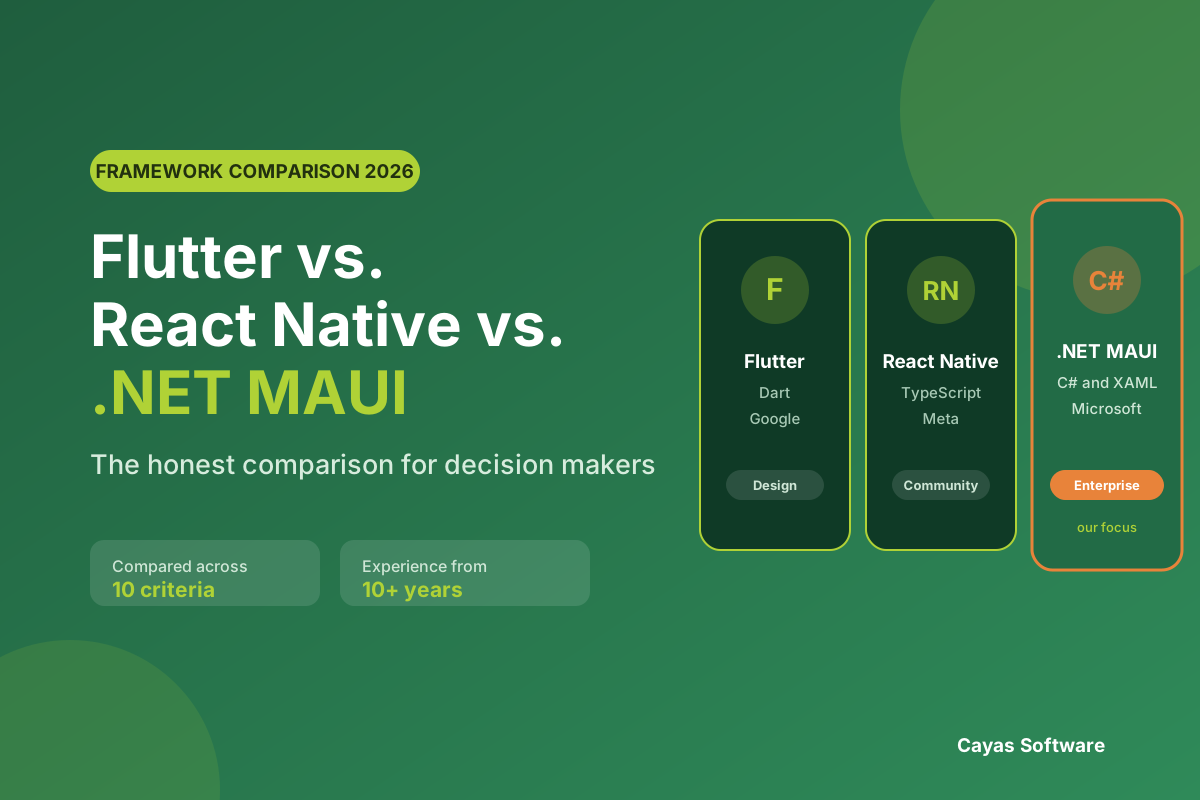
Flutter or React Native? Most comparisons stop at two frameworks and leave out the third strong option. This guide compares Flutter, React Native and .NET MAUI against the criteria that actually matter to decision makers: cost, maintainability, team availability and long-term viability.
BlogFlutter vs. React Native vs. .NET MAUI: 2026 Comparison
“Flutter or React Native?” We get asked this in almost every first conversation about an app for iOS and Android. It is a fair question. The choice of framework determines who can build the app at all, how it feels in daily use, what its upkeep costs every year and how much of it is still usable in five years. The question is just put too narrowly. Treating Flutter and React Native as a two-horse race leaves out a third option that often suits B2B projects in mid-sized companies better: .NET MAUI from Microsoft.
This gap is easy to verify. We looked at the German-language results Google returns for this search, and .NET MAUI does not appear as an option in its own right in a single one of the top ten articles. The comparison articles stop at two frameworks almost without exception. So for projects whose backend runs in Azure, whose business logic has been written in C# for years, or which have to serve Windows machines on the factory floor alongside mobile devices, the option that would fit best is simply absent.
We have been working in cross-platform development for over 10 years, were a Xamarin Premier Partner, lived through the end of Xamarin and moved client projects across to .NET MAUI. Our main framework today is .NET MAUI, and that experience naturally shapes our view. You will still not find a recommendation for MAUI at any price here. There are projects where we recommend Flutter, projects where we recommend React Native, and projects where we advise against cross-platform altogether.
This article is written for decision makers, not for developers. Code and syntax comparisons you will not find here. Instead the criteria that affect your project: cost across the whole lifetime, availability of developers, maintainability, integration into your existing IT and responsibility for the technology in five years. One criterion has been added that appeared in no comparison two years ago. How well do AI assistants cope with each framework, and how easily can you add AI features to your app later?
Cross-platform, hybrid, native: sorting out the terms
In quotes and conversations four terms regularly get thrown together, and the customer ends up buying something other than what they understood. So let us sort them out first.
Native apps are developed separately for each platform, with Swift and SwiftUI for iOS and Kotlin for Android. Two code bases, two teams or at least two skill sets, two release processes. Access to everything the device can do is direct, with nothing in between.
Cross-platform apps share a single code base that is compiled into real apps for each platform. Flutter, React Native and .NET MAUI all belong in this category. They differ in how the interface is produced: React Native and .NET MAUI use the real controls of the platform, while Flutter draws the interface itself with its own graphics engine.
Hybrid apps are essentially web applications inside a container, classically with Cordova or Ionic. The interface runs in an embedded browser. That is quick and cheap to build, but it rarely feels like a proper app, and offline operation, background processes or heavy hardware use quickly become a struggle. If someone offers you “hybrid app development”, it is worth asking what exactly they mean. Often they mean cross-platform, sometimes they really do mean a WebView.
Progressive web apps run entirely in the browser and are not distributed through the stores. A solid choice for pure information services, usually not enough for process apps that need a camera, Bluetooth or reliable offline mode.
Only the second category matters for this comparison. Wherever this article says cross-platform from here on, it means compiled apps with a shared code base, not packaged websites.
When cross-platform app development pays off and when it does not
The obvious advantage of a shared code base is the work you only do once. More important is an advantage that only shows up in the second year. A change to the business logic happens in one place and takes effect the same way on every platform, a bug is found once and fixed once, and one team owns the overall result instead of two teams waiting on each other with feature sets that keep drifting apart. We call that consistency.
Anyone who has watched the Android version of an app trail the iOS version by two releases because capacity was allocated differently knows what that is worth. That a shared code base is also cheaper than two separate ones is a welcome side effect, but it is not the reason we recommend it.
On top of that comes a shorter time to market, because concept, design and development only run once. Our page on cross-platform development with .NET MAUI shows what that looks like in detail and how we set projects up.
The limits matter just as much. Cross-platform is the wrong choice when:
the app pushes graphics or computation to the limit. 3D rendering, augmented reality, gaming, real-time image processing or demanding video editing are a case for native development.
you have to go very deep into platform features very early. If a new iOS feature has to be in your app on the day it is released, native iOS development is the more direct route. Cross-platform frameworks usually need a few weeks for additions like that, or a binding of your own.
only one platform is relevant. If all your users have company iPhones or your app only ever runs on rugged Android handhelds in the warehouse, the main advantage does not apply.
you have to integrate a specialised hardware SDK that only exists natively, for industrial scanners, medical devices or unusual sensors. A binding is almost always feasible, but it costs money and needs permanent upkeep.
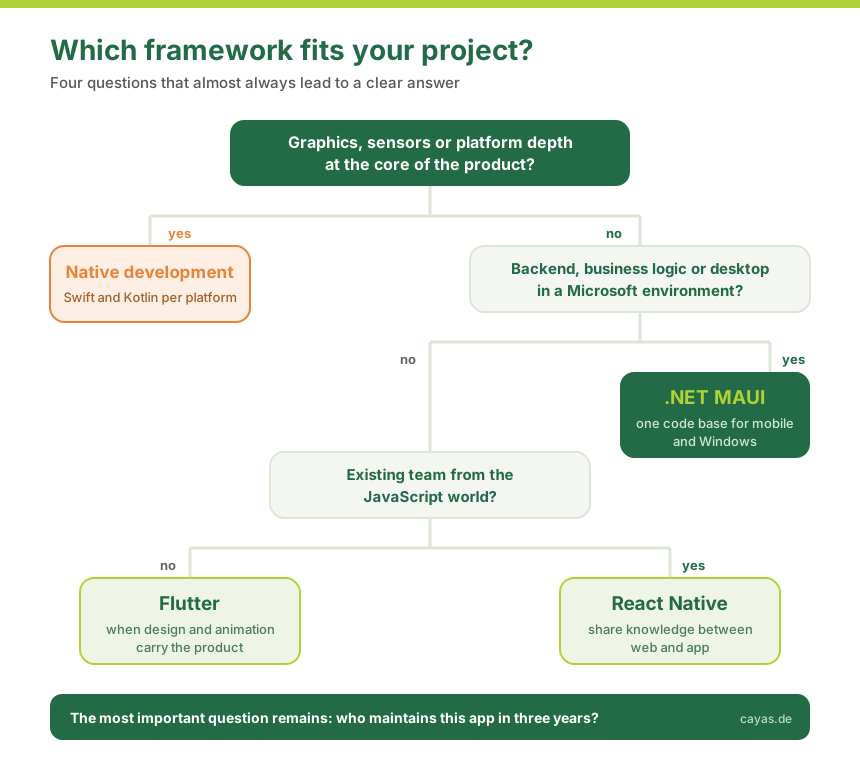
Our rule of thumb from practice: if two platforms are needed and the app essentially captures, displays and synchronises data and maps out processes, cross-platform is almost always the better choice commercially and organisationally. If the app draws what makes it special from graphics, sensors or platform depth, it becomes native.
Native or cross-platform? Let us work it out in a conversation
You do not have to make this fundamental decision on your own. Send us a short outline of what your app should do, and in a free initial consultation we will tell you which route suits your project. Including when that means cross-platform is the wrong answer.
All three frameworks are mature, are developed by large corporations and solve the same underlying problem in different ways. Almost anything is possible with all three. What differs is what comes easily and what you have to work for.
Flutter by Google
Flutter uses the Dart programming language and draws its interface with its own graphics engine, in current versions with Impeller on iOS and Android. So Flutter does not ask the platform for a button, it paints the button itself. That sets it apart from the other two at a fundamental level. As of mid-2026, Flutter 3.44 with Dart 3.12 is current, the ecosystem is large and the tooling is excellent.
Strengths: An interface looks exactly the same on every platform, which is a real advantage under strict brand guidelines. For demanding animations and bespoke designs, Flutter is the most productive of the three frameworks. Hot reload makes design work fast, and web and desktop provide additional output targets.
Limits: Dart is barely used outside Flutter. When you build a team you are not looking for developers with a widely used language, you are looking for Flutter developers. Because Flutter draws the interface itself, that interface does not automatically follow the look of the platform, which some users find alien in business apps. Binding native libraries takes a little more effort, and the finished apps tend to be larger.
React Native by Meta
React Native builds on JavaScript, or rather TypeScript, and drives the real controls of the platform. Anyone who knows React from web development will feel at home immediately. The reworked architecture with JSI, Fabric and TurboModules has been the standard since version 0.76 and has largely removed the old bottleneck between JavaScript and native code. With version 0.86 from June 2026, new projects start entirely without the old bridge.
Strengths: The market for JavaScript and TypeScript developers is the largest of the three options. If you already have a web team, you can share knowledge and some of the code. The npm ecosystem is enormous, a package exists for almost every requirement, and Expo provides a very comfortable environment for building and shipping.
Limits: That same ecosystem is also the biggest weak spot. Many packages are maintained by individuals, and a React Native update can trigger a chain of adjustments. In long-lived enterprise projects, keeping dependencies healthy is a permanent line item that tends to be underestimated. For desktop applications, React Native only works with additional projects.
.NET MAUI by Microsoft
.NET MAUI is the successor to Xamarin.Forms, uses C# and XAML and produces apps for iOS, Android, Windows and macOS from one code base. Like React Native, MAUI uses the real controls of the platform. It ships on the fixed .NET rhythm, and .NET 10 has provided an LTS version with three years of committed support since 11 November 2025. .NET MAUI 11 is already in preview.
As a former Xamarin Premier Partner and one of the most experienced .NET MAUI providers in Germany, we see every day where MAUI plays to its strengths, and it is rarely the slick consumer app.
Strengths: MAUI is strong wherever an app is part of a larger system landscape. C# is a statically typed language with mature tooling, and many mid-sized companies have already written their business logic in it. Models, validations and services can be shared between backend and app instead of being maintained twice. Connecting to Azure, Active Directory, Dynamics or an existing .NET backend is routine in MAUI and not an integration project of its own. On top of that, MAUI is the only one of the three frameworks that treats Windows desktop as a first-class target, and in industry that turns out to be the deciding factor surprisingly often.
Limits: The community is considerably smaller than those of Flutter and React Native. GitHub stars give a rough sense of the gap: Flutter sits at around 170,000, React Native at around 120,000 and .NET MAUI at a good 20,000. For a niche problem you will less often find a ready answer, and there are fewer off-the-shelf packages. Highly bespoke, animation-heavy interfaces are more work in MAUI than in Flutter. If you want to stay strategically independent of Microsoft, MAUI is the wrong tool.
Flutter vs. React Native vs. .NET MAUI: the comparison across ten criteria
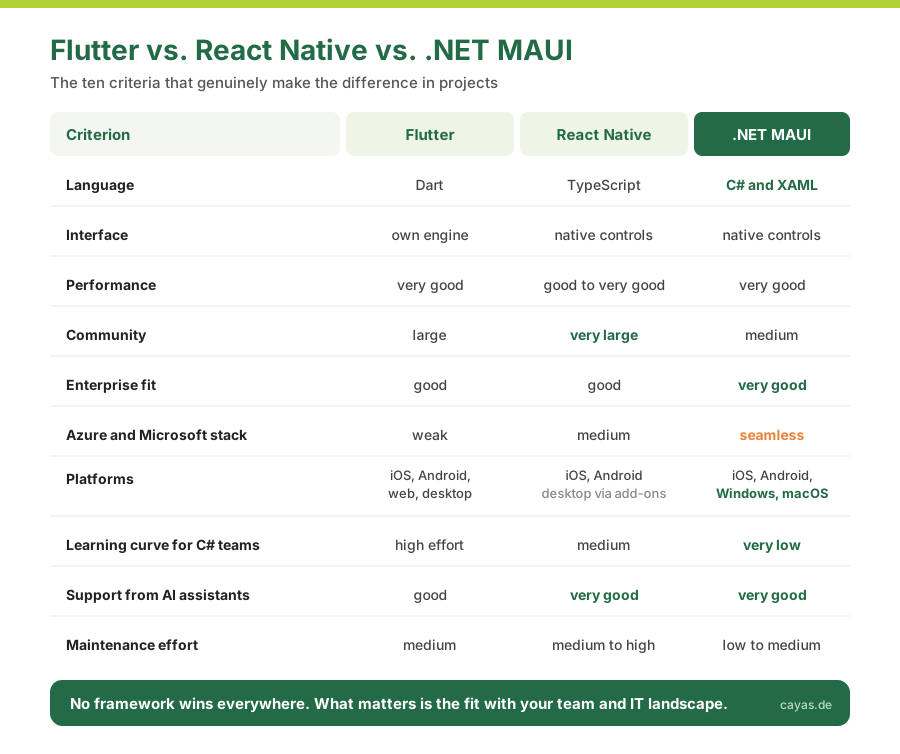
The overview below sums up what actually differs in projects. It is no substitute for a proper conversation, but it shows quickly which way your project leans.
Criterion
Flutter
React Native
.NET MAUI
Language
Dart
JavaScript / TypeScript
C# and XAML
Interface
Own engine (Impeller)
Native controls
Native controls
Performance
Very good
Good to very good
Very good
Community
Large
Very large
Medium
Enterprise fit
Good
Good
Very good
Azure and Microsoft stack
Weak
Medium
Seamless
Platforms
iOS, Android, web, desktop
iOS, Android (web and desktop via extra projects)
iOS, Android, Windows, macOS
Learning curve for C# teams
High
Medium
Low
Support from AI assistants
Good
Very good
Very good
Maintenance effort
Medium
Medium to high
Low to medium
Language and team. This criterion is underestimated more often than any other and is usually the deciding one. The question is not which language is the more elegant one, but who maintains your app in three years. If you already have .NET developers in house, MAUI is the shortest route, because they become productive without switching language. If you have a web team with React experience, the same applies to React Native. A good developer learns Dart in a few weeks, but it remains a language that is worth nothing outside Flutter.
Interface and feel. Flutter guarantees you pixel-identical output across all platforms. React Native and MAUI guarantee that the app feels like an iOS or an Android app. Both are equally well built. All you are deciding here is whether the brand takes priority or the habits of the platform. With internal process apps, habit almost always wins, because staff then have nothing new to learn. With brand-driven consumer apps it is the other way round. Our page on professional app design describes the role design plays in this.
Performance. This criterion fills most of the discussions and decides the fewest projects. Lists, forms, camera, barcode, offline sync and maps all run smoothly in all three frameworks, and for the vast majority of business apps that is the whole story. The difference only becomes measurable with very demanding animations and long lists with complex rows, where Flutter is slightly ahead thanks to its own engine. For genuinely extreme requirements, none of the three will do.
Ecosystem and maintenance. For React Native there is a package for every requirement, and with every package you inherit a dependency that somebody has to maintain, that can break on a framework update and that in the worst case is looked after by a single person at the weekend. MAUI has fewer packages, but its core comes from one source and follows a predictable release cycle. Flutter sits in between and has a well curated package source in pub.dev. Count the dependencies. Over five years they tell you more about your costs than any performance benchmark.
Platform reach. When Windows joins iOS and Android, for instance a control station in production or a desk application for the back office, MAUI is currently the only option with a mature desktop target from the same code base. Flutter can do desktop as well, but it is less widespread there. React Native needs additional projects for it.
Integration into your IT. An app is rarely alone. It hangs off an ERP, a database, a user directory. If that environment runs on Microsoft technology, MAUI saves you an entire integration layer, because authentication, configuration and data models all live in the same language. If your backend runs on Node.js, the same thinking applies to React Native.
What AI changes about the framework question
Until recently, the choice of programming language was purely a staffing question. Since AI assistants like GitHub Copilot became part of everyday development, a second aspect has come into play that framework comparisons still almost never mention.
AI in the development process. Language models are strongest where the most code exists for them to have learned from. For TypeScript and C# that means: very good suggestions, usable tests, reliable explanations of unfamiliar code. Dart is represented far more thinly, so a developer working in Flutter has to rework the output more often. This is not a knock-out criterion. It does noticeably shift the language and team criterion, though, because a C# team with AI support becomes productive in .NET MAUI faster than in a language that neither the team nor the model knows well. For us, AI mainly speeds up routine work, so test coverage, migrations and recurring interface components. Architecture, data model and process logic still take shape in someone's head.
AI features in the app itself. More and more B2B projects come to us with an AI component: a search that understands free text, receipt recognition through the camera, voice notes that turn into structured reports, or assistance features for field staff. Technically that is decided less in the framework than in the backend, because the models run in the cloud or on the device. Proximity to your own stack pays off here. If your services run in Azure, you attach AI features with .NET MAUI without a detour, because app and backend speak the same language. For models running directly on the device, all three frameworks use the platform interfaces from Apple and Google, with Flutter and React Native going through additional packages.
Our take. AI writes code, but it makes no decisions and carries no responsibility. We increasingly see prototypes assembled with AI tools that work at first glance. As soon as offline operation, permission management, data protection or a store review enter the picture, that turns into work for people who know what they are doing. What this means for liability comes further down.
What cross-platform apps really cost
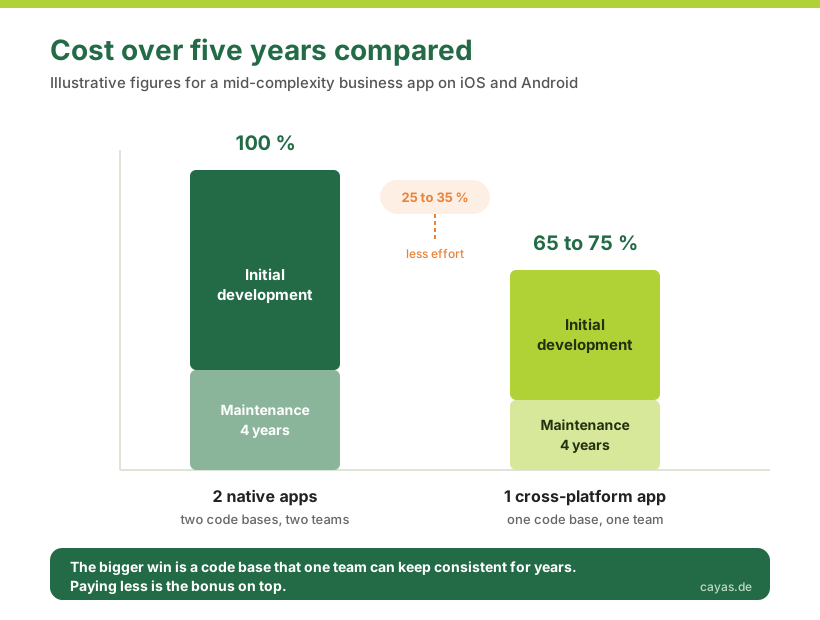
The most quoted number in this field is the saving against two native apps. In our projects it comes to roughly 25 to 35 percent. We consider the frequently cited 50 percent too optimistic, because concept, design, backend, testing, store submission and project management all arise regardless of the technology. What gets shared is interface and logic development, and even there a platform-specific remainder of around 10 to 20 percent stays behind.
As a guide for a cross-platform app covering iOS and Android:
Simple app with a clearly bounded feature set, a standard interface and one integration: from roughly 30,000 to 60,000 euro.
Mid-complexity business app with user management, offline capability, a backend and several roles: roughly 60,000 to 150,000 euro.
Enterprise app connected to existing systems, with high security requirements and bespoke processes: from roughly 150,000 euro.
Between the frameworks themselves, the differences in initial development are small. The feature set is what decides the budget. The framework choice becomes relevant in the running costs, and there it is worth looking at five years rather than at the quote. Budget roughly 15 to 20 percent of the development cost per year for maintenance and further development. We have broken these items down in detail in our cost overview and in the guide on what app development costs.
The items that regularly go missing from quotes:
Platform-specific adjustments. Push notifications, permissions, background behaviour and file access work differently on iOS and Android. Apple and Google simply do it differently, and no framework takes that difference off your hands.
Testing on real devices. A shared code base does not mean you only have to test once. Cross-platform barely reduces the testing effort.
Framework and platform updates. iOS and Android ship a new major version every year. If you do not budget for that upkeep, you pay for it later as a remediation project.
What would your app cost?
The ranges above are figures from our own projects. The budget your project really needs depends on the feature set. Our cost overview breaks down the individual items, from the concept through to maintenance.
Native or cross-platform? The decision in five questions
Before you think about frameworks, settle the question of principle. These five points almost always produce a clear answer.
Do you really need both platforms? Do not ask about market share, ask about your users. With internal apps on managed devices the answer is often obvious, and then the main advantage of cross-platform falls away.
Does the app draw its value from graphics or sensors? If AR, 3D, real-time image processing or game mechanics are at the core, native development is the right answer. If data, forms, processes and synchronisation form the core, it is cross-platform.
How deep into the platform do you have to go? Check specifically which device features you need. Camera, location, Bluetooth, barcode, offline storage and push are standard in all three frameworks. With specialised SDKs, system extensions or brand new operating system features it gets more involved.
What can your team do, and what should it be able to do in future? The best technology is the one you can find people for and the one that fits your existing landscape. No technical detail weighs more heavily.
How long should the app live? A prototype testing a hypothesis follows different rules than an application that carries a core process for ten years. The longer the horizon, the more maintainability and support commitments count.
If three or more answers point towards cross-platform, the question of principle is settled. If they point towards native, our pages on iOS app development and Android app development show how we go about it.
Which framework for which project? Six scenarios from practice
Abstract criteria only help up to a point. So here are the scenarios we meet most often in consulting, each with a clear recommendation.
B2B app with an Azure backend and connections to existing systems. Recommendation: .NET MAUI. A maintenance team records work orders on mobile, the data flows into an existing .NET backend, sign-in goes through the company directory. What saves time here is shared data models and a sign-in that works first time. A slick framework does nothing for you at this point. This is our typical project shape.
Industrial application for mobile devices and Windows workstations. Recommendation: .NET MAUI. When the warehouse worker uses the handheld and the supervisor sees the same process on a Windows machine, you need a framework that does not treat desktop as a by-product. That is currently the clearest single case for MAUI.
Consumer app with an elaborate brand design. Recommendation: Flutter. When every animation has to land and the app has to look identical on every device, Flutter is the most productive tool. MAUI could do it too, it would just cost you considerably more time.
Start-up with an existing JavaScript team. Recommendation: React Native. If your web team already uses React, you can go mobile without starting over and share both knowledge and parts of the code. The price is dependency maintenance, which you should plan for from the start.
MVP to test a business idea. Recommendation: Flutter or React Native, depending on the team. Speed is what counts in this phase, and both ecosystems offer ready-made building blocks for standard features. If it is foreseeable that the MVP will grow into an enterprise application, it is worth considering MAUI from the start rather than switching later. Our guide on having an app developed describes how a project like that runs.
An existing Xamarin app that has to be modernised. Recommendation: .NET MAUI. Moving to Flutter or React Native means starting from zero. With MAUI you usually keep business logic, data access and services and convert the interface step by step. Everything we have learned about this route is on our page about Xamarin development and migration.
The question hardly any comparison asks: who carries the responsibility in five years?
Framework comparisons usually stop at performance and community size. In client conversations, something else occupies us most. What happens when the technology underneath your app disappears?
We cannot answer that question in the abstract, we have lived it. Support for Xamarin ended on 1 May 2024. We were a Xamarin Premier Partner, had built apps on it for years, and a deadline still came for us. Apps kept running, but without security updates, and the risk grew with every new iOS and Android version. No provider on earth can guarantee you that Flutter, React Native or .NET MAUI will still exist in ten years.
What you can check instead are four solid criteria:
Binding support periods. For LTS versions, .NET names a concrete end date and three years of patches. Flutter and React Native work in fast cycles and without a comparable formal commitment.
Adoption in companies. The more firms run a framework in production, the more expensive a discontinuation becomes for the vendor and the longer developers for it remain available.
A realistic exit route. Going from Xamarin to MAUI we only had to rebuild the interface, and the business logic in C# stayed intact. Ask about every framework what survives of your investment when the interface technology changes.
Where your value sits. The more business logic you keep framework-independent, the more rarely this question comes up at all. That is architecture work and money well spent, whatever framework ends up underneath.
Connected to this is a point that rarely surfaces in technology discussions even though it matters most to managing directors: liability. Since the revised EU Product Liability Directive of 2024, software counts explicitly as a product. If your app carries a business-critical process and fails, the relevant question is not what the development cost, but who is answerable for the outage. An app assembled with AI on top of a generic framework has no answer to that. A partner who commands the technology, knows the support cycle and stands behind the result does. You can see which projects we have supported on that basis in our reference projects, among them CLAAS, flaschenpost and MEDIFOX DAN.
Why we build on .NET MAUI and when we advise against it
We would have no credibility if we claimed at the end of a comparison that our main framework is the best for everything. It is not. There is one project type, though, where we recommend it without hesitation, and it describes a large part of the German mid-market: an app that carries a business process, that is connected to existing systems, that is meant to live for ten years and whose environment runs on Microsoft technology. MAUI plays to its strengths there, because an app like that never stays an island. It extends a landscape that is already thought out in C#.
In concrete terms: one team, one language, shared models between backend and app, a sign-in that fits the existing user directory and, where needed, the same application on the Windows machine. At CLAAS, flaschenpost and MEDIFOX DAN we have implemented exactly this shape, in some cases across years from Xamarin through to .NET MAUI, without rebuilding the business logic.
And now the honest part. We advise against .NET MAUI when:
you are building a design-driven consumer app where animations and a distinctive look are the product. Take Flutter.
your team consists of web developers and there is no .NET expertise in place or planned. Take React Native.
you want to stay strategically independent of Microsoft. That is a legitimate decision, and then MAUI is the wrong choice.
you need one very specific library that only exists for Flutter or in the npm ecosystem. A binding is possible, but rarely economical.
This honesty is not an end in itself. A project that starts with the wrong framework turns unpleasant for both sides, and we have turned down enquiries because a different approach would have fitted better. If you are unsure which direction is right for your project, we will work it out in a free initial consultation, including when the answer is a framework we do not work with.
One code base for iOS, Android and Windows
How we set up cross-platform projects with .NET MAUI, from the architecture through the connection to existing systems to maintenance, is laid out in detail on our service page.
In many B2B projects the answer to “Flutter or React Native?” is simply .NET MAUI. In other projects Flutter or React Native is clearly right, and sometimes the route leads back to native development. Press coverage and popularity will not help you with this decision. What counts is your team, your IT landscape and your time horizon.
The short version:
Flutter, when design and animation carry the product and one consistent look across all platforms matters more than platform habits.
React Native, when your team comes from the JavaScript world and you want to share knowledge between web and app. Plan for dependency maintenance from the start.
.NET MAUI, when the app carries a business process, is connected to existing systems, is meant to live a long time or has to serve Windows alongside mobile devices.
Native, when graphics, sensors or platform depth form the core of your product or only one platform is relevant.
If you want to know how a cross-platform project actually runs, what the phases are and how we work, you will find that on our page about cross-platform app development. And if you would rather talk your situation through with someone who has been on the receiving end of a framework migration, get in touch for a framework consultation. We will tell you openly what we would recommend, even when that means no project for us.
FAQ
Usually yes, but less dramatically than is often claimed. In our experience a shared code base for iOS and Android comes in roughly 25 to 35 percent below the effort for two separate native apps. The effect only becomes really noticeable in operation, when one code base, one team and one release process carry you through the whole year. Price alone is therefore a poor reason to decide. Ask instead which architecture you can maintain reliably for five years.
For normal business apps with lists, forms, camera and offline sync, Flutter, React Native and .NET MAUI are all fast enough. Users notice no difference. Performance only becomes relevant with very demanding animations, continuous operation with sensor data or graphics-heavy interfaces. There Flutter has a slight edge with its own rendering engine Impeller, while React Native and .NET MAUI rely on the native interface of the platform. For genuinely extreme cases such as 3D, AR or gaming, native development is the right choice.
Yes. .NET MAUI compiles C# code for iOS, Android, Windows and macOS and uses the real controls of each platform in the process. An iOS app built with .NET MAUI looks and feels like an iOS app and is published through the App Store as normal. A Mac is required to develop and build the iOS version, which is the case with every framework.
Yes. Support for Xamarin ended on 1 May 2024. Xamarin apps do keep running, but they no longer receive security updates and become riskier with every new iOS and Android version. The route to .NET MAUI is well prepared because MAUI is the direct successor: business logic, data access and services can usually be carried over, and the interface is converted step by step. We have guided several client projects along this route, among them flaschenpost.
A focused MVP for iOS and Android is usually usable within 3 to 5 months. A mid-complexity business app with a backend connection needs 6 to 9 months, and an enterprise app with many interfaces 9 to 18 months. Compared with two separate native apps you mainly gain time because concept, design, testing and releases only run once.
If both platforms are needed, it is especially worthwhile for small apps. The share of effort that arises regardless of technology is relatively high in small projects, and with two native apps you pay it twice. If only one platform is relevant, for instance because all staff use company iPhones, a native app is often the more direct route.
A hybrid app is essentially a website running inside a container on the device, for example with Ionic or Cordova. Controls are recreated in the browser. A cross-platform app built with Flutter, React Native or .NET MAUI is compiled instead and accesses device features directly, with no browser in between. The result feels considerably closer to a native app. In everyday speech the two terms often get mixed up, but technically they are two different approaches.
For a prototype or an internal helper tool that can be enough. With an app that carries a business process, the road usually ends at the same points: permission and role concepts, offline operation, data protection, connection to existing systems, store review and the annual operating system updates. AI assistants speed up the work of developers considerably and we use them daily. They make no architectural decisions, though, and they carry no liability. Since the EU Product Liability Directive of 2024, software counts explicitly as a product, and in the event of damage what matters is who is answerable.
That is decided less in the framework than in the backend, because the models run in the cloud or on the device. If your services sit in Azure, .NET MAUI is the shortest route, because app and backend speak the same language and you need no additional integration layer. For models running directly on the device, all three frameworks use the interfaces from Apple and Google, with Flutter and React Native going through additional packages.
All three are developed by large corporations, and all three can be discontinued. We experienced that ourselves with Xamarin. Verifiable criteria therefore help you more than promises: an official support period, broad adoption in companies, a realistic migration path and the question of how much of your investment sits in business logic rather than in framework-specific interfaces. With the LTS cycle of .NET, .NET MAUI has the formally clearest arrangement here, while Flutter and React Native have the wider adoption.
Sebastian Seidel
As a mobile enthusiast and managing director of Cayas Software GmbH, it is very important to me to support my team and our customers in discovering new potential and growing together. Here I mainly write about the development of Android and iOS apps with Xamarin and .NET MAUI.
Want to have an app developed but not sure where to start? This guide walks you through the process, the choice between agency, freelancer and offshore, the right briefing and all the questions you should answer before you begin.
What does an app cost? This budget guide explains the cost factors, shows honest price ranges from over 10 years of agency practice and helps you plan your budget realistically.
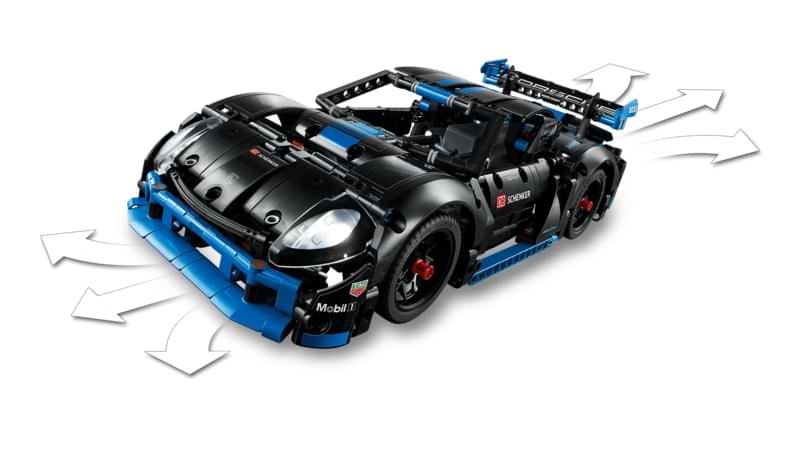
Bluetooth Low Energy with .NET MAUI: This article shows how to connect BLE-enabled devices cross-platform for Android and iOS. The LEGO Porsche GT4 e-Performance with the official LEGO Wireless Protocol serves as a practical example, including hub service, port detection, and motor control.