When does an overhaul of an old application pay off, and when is it enough to keep it running? This guide covers the warning signs, the cost of doing nothing, four routes to modernisation, the process, the role of AI and the typical risks, with two projects from practice.
BlogLegacy Software Modernisation: Does It Pay Off?
Somewhere in your company there is probably an application nobody wants to touch any more. For years it has reliably done what it should. But the developer who built it moved on long ago, the framework underneath is no longer maintained, and every update feels like open-heart surgery. Sound familiar?
Sooner or later the question arises whether to modernise, which in most cases has long been decided. What remains open is when and how, and that is where things get murky for most companies. In over twelve years of project work we have taken over grown applications and brought them into a maintainable future. We also build complete custom software when a rebuild turns out to be the right answer after all. What we notice: technology is not the biggest problem. The greater weight lies in the uncertainty about when the right moment is and what is at stake in the overhaul.
This guide is meant to help you put that in order. It is aimed at managing directors, IT leads and department heads who have to decide whether the effort pays off, not at developers who want to know how to migrate technically. For that we have a separate guide to migrating from Xamarin.Forms to .NET MAUI. Here you get the warning signs, the cost of doing nothing, four routes to modernisation, a process model, the role of AI, the typical risks and two projects from practice. The answer “leave it as it is” belongs on that list too, because sometimes keeping a system running is the right decision.
How to tell your software needs modernising
Software does not suddenly become “old”. But there are signals that accumulate, and if you recognise several of them, the point is fairly close.
The vendor ends support. The most prominent example of recent years: Microsoft ended support for Xamarin on 1 May 2024. Anyone still building on Xamarin, Gatsby or Polymer today is building on a foundation that no longer receives security updates.
Dependencies stop receiving updates. Libraries your software builds on are no longer maintained, and every new security vulnerability adds to the risk.
New operating system versions break functions. iOS or Android updates that knock out existing features are a reliable sign that the technical base is not keeping up.
Hardly any developer on the market masters the technology any more. If you search for months to fill an open position and find nobody who knows the technology in use, recruiting is rarely the reason. The technology is the problem.
Every change takes longer than it used to. If a small feature that would once have taken two days now takes two weeks because nobody dares to go through the code, that is a direct cost signal.
The software hinders business processes instead of supporting them. If your team builds workarounds, works around the software or maintains Excel sheets because the system itself cannot keep up, the relationship has been turned upside down.
Compliance requirements can no longer be met. Especially with GDPR or industry-specific obligations, outdated systems hit limits that a few patches will not solve.
A single one of these signals is no reason to worry yet. Three or four at the same time are a reason to talk to us.
What doing nothing costs
Modernisation costs money, no question. But doing nothing costs something too, something you do not see at a glance because it is spread over months and years.
Technical debt makes every further change more expensive. Every stopgap, every workaround, every feature that gets squeezed in somehow makes the next change more laborious. What is one extra day today can cost a week in two years.
Maintenance costs rise as the software ages. Specialists for outdated technologies are rarer and more expensive than specialists for current ones. Higher hourly rates and less choice hit you twice.
Security risks are not an abstract topic. An application that no longer receives updates collects known vulnerabilities over the years that nobody closes. For software that handles customer data or company processes, that is a business risk.
Missed business opportunities are the most expensive item and the hardest to put a number on. If your competitors ship new features in weeks and you need months for the same change, it costs you market share in the end.
Then there is dependence on individuals. If only one person in the company still understands how the system really works, or worse, the person who can no longer be reached, you have an operational risk that is secured by nothing but hope.
There are also cases where keeping a system running is the right decision. A stable application with a foreseeable end date, which will be replaced in two years anyway, does not need to be modernised any more. Check carefully whether that is really your case, or whether “we will look at it next year” is just another way of saying “we are putting it off”.
Four routes to software modernisation
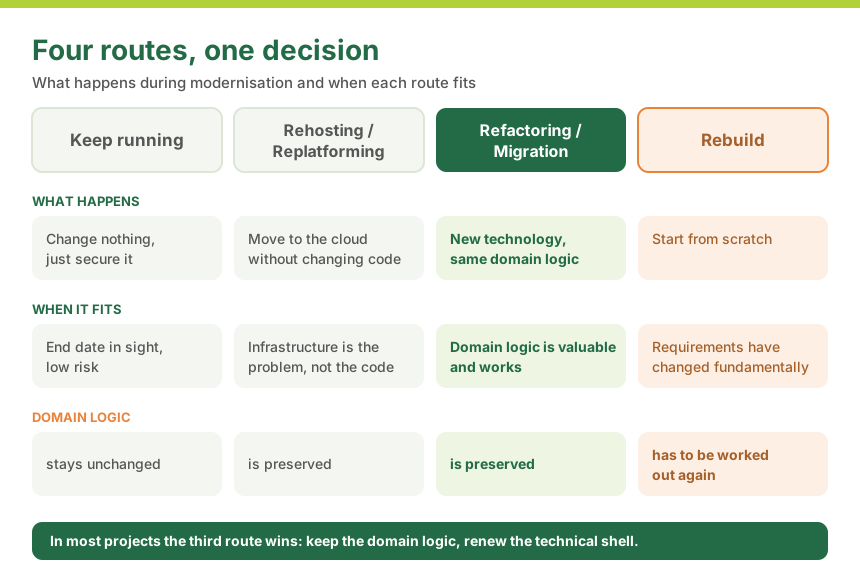
Modernisation is not all or nothing. There are four basic routes, which depend on where exactly the problem lies.
Route
What happens
When it makes sense
Keep running
Change nothing, just secure it
End date in sight, low risk
Rehosting / replatforming
Move to the cloud without changing the code
The infrastructure is the problem, not the code
Refactoring / migration
Change the technology, keep the domain logic
The domain logic is valuable and works
Rebuild
Start from scratch
Requirements have changed fundamentally
The most important message in this table: a rebuild is rarely the right answer. Starting with a clean sheet sounds tempting. But an application that has grown over years contains domain knowledge that in most cases nobody has fully written down. Special cases, exception rules and silent assumptions that settled in over the years because they proved right. Throwing that software away completely means working out this knowledge a second time, usually at greater cost and more slowly than the first build took. In the large majority of the projects we support, refactoring or migration is the right route: the domain logic stays, the technical shell is renewed.
If your question is a different one, namely whether you need your own solution for a process at all or whether a standard product is enough, our guide Custom software vs. off-the-shelf helps with that decision.
Software migration in practice: two projects
Theory is one side. Here are two projects that show what this looks like in practice.
MEDIFOX DAN CareMobile. The app was technologically outdated and ran on Android only. We migrated the application to .NET MAUI under a hard trade fair deadline. The result: a modernised architecture that now serves iOS and Android, and an internal development team that was enabled through workshops, accompanied code reviews and documented best practices to develop the application itself. More in the MEDIFOX DAN case study.
flaschenpost driver app. This was an app that delivery drivers at more than 30 locations rely on in their daily work. A particular challenge was replacing the navigation solution: the new provider supplied a Java-based SDK, which we integrated into the app through a .NET for Android binding. Later we migrated the app from Xamarin.Forms to .NET MAUI while it stayed in use. Details in the flaschenpost case study. How an app project like this runs from requirements analysis to operation is explained on our page on app development.
Both projects had a concrete trigger: expiring support, a missing platform or a component that could no longer keep up with growth. And both show that, with clean planning, a migration can be completed in manageable time frames without operations suffering.
Is your current provider no longer the right fit?
We take over existing apps and software projects even in the middle of live operation, for example when your provider is no longer the right fit, can no longer be reached or the knowledge in the team is missing. It starts with a code audit: we look at architecture, code and interfaces and tell you what can be continued and what is better rebuilt.
A modernisation project follows a fixed phase model with us, which gives you planning certainty as a decision maker:
Assessment and code analysis. Before anything is changed, we build a complete picture: what does the software do, which of it is still relevant, where are the risks? AI assistants speed up reading large codebases, while experienced developers do the evaluation.
Target architecture. Based on the assessment, a technical target picture emerges: which technology, which structure, which interfaces.
Migration strategy: big bang or step by step. This is the question that preoccupies decision makers most, because it directly determines the risk of downtime. With the big-bang approach the entire application is switched over in one go: faster, but riskier. With a step-by-step migration, old and new parts run in parallel until the switch is complete: slower, but with considerably lower risk for ongoing operation. In most of our projects we recommend the step-by-step route, especially when the software is business-critical.
Implementation in stages. The migration happens in manageable, testable sections instead of one big leap.
Parallel operation and switchover. Old and new run side by side until there is confidence in the new solution.
Knowledge transfer to the internal team. A modernisation that in the end only an external agency understands has missed its actual goal. That is why knowledge transfer is a fixed part of the project for us. How we build up teams is described on our page on training and workshops.
Modernisation with AI: faster when the experience is there
Hardly any task suits AI assistants as well as modernising a legacy application. The job is to read existing code, understand it and carry it over into a new form, and that is exactly what these tools are good at. We work with them daily and notice it in every project: much of what used to cost weeks of groundwork now goes considerably faster. This applies above all to four areas:
Assessment. Assistants read large codebases, summarise modules, dependencies and interfaces, and even make code readable that hardly anyone still masters. That quickly produces a first map of the application.
Tests for the existing behaviour. AI suggests test cases that record what the software actually does today. Test coverage before the migration then grows faster than it could by hand.
Mechanical conversion. Namespaces, project structures and recurring patterns can largely be carried over automatically. In a migration from Xamarin.Forms to .NET MAUI that is, for example, a considerable part of the work, and the technical details are in our guide to the Xamarin migration.
Documentation. The description that never existed is generated from the code. That makes knowledge transfer to the internal team easier.
What AI does not deliver is the part that decides success. It simply does not know your business. Whether a special rule in the code is still wanted or a relic of a long-forgotten customer request, no assistant can judge. Which parts get lifted out first and behind which interface is likewise an architecture decision. On top comes a risk that experienced developers recognise reliably: generated code looks plausible and still behaves differently in one place, for instance with rounding, time zones or the order of records. Such deviations then only surface in production, when nobody is looking for them any more.
That is why we work like this: AI does the groundwork, experienced developers make the decisions and check every result against the tests. Anyone who knows the domain logic and the target architecture uses AI where it saves time and quickly spots where it is off. When it comes to liability there is no exception for tools. Since the revision of EU product liability, software explicitly counts as a product, and when a migrated application delivers wrong values in daily operation, nobody asks how the code came about.
For your decision this means two things. On the one hand, modernisation becomes easier to plan and often cheaper than it was a few years ago, because analysis, tests and conversion take less time. How much depends on scope, code quality and existing tests, and a flat percentage would not be credible. On the other hand, postponing loses none of its risk: end of support, missing updates and fading knowledge remain, no matter how fast the conversion goes later.
The modernised application has one more advantage: it can be connected to AI services. A legacy system without clean interfaces or with a proprietary data format is hardly suitable for that. On the new foundation you can build your own AI features, for example forecasts from the history of your own data.
The typical risks and how to control them
We would not be doing you a favour if we presented modernisation as risk-free. Here are a few typical risks and what helps against them:
Loss of functionality. During the migration a rarely used but important function is overlooked. Countermeasure: a thorough assessment before the first line of code is written, not after.
Underestimated effort. Legacy systems almost always contain more hidden complexity than is visible at first glance. Countermeasure: plan realistic buffers and deliver in stages instead of promising a rigid fixed-price package that ends up being renegotiated anyway.
Missing documentation. This is the most common reality with grown software. Countermeasure: tests record the actual behaviour, and the systematic analysis of the code replaces the missing documentation.
Dependence on legacy knowledge. Often a single person understands the old system. Countermeasure: involve that person early and in a structured way, and document their knowledge before it is lost.
Test coverage. Old systems rarely have good automated tests. Countermeasure: build test coverage for critical paths deliberately before the migration, which goes faster with AI support than it used to. That way you can check objectively after the conversion whether the behaviour has changed.
What does a software modernisation cost?
That depends heavily on the size of the legacy application, the chosen strategy and the degree of parallel operation. A step-by-step migration with parallel operation is more laborious than a big-bang approach, but considerably less risky. The biggest cost drivers are the time it takes to fully understand the domain logic of the legacy application and to transfer it without errors. The new technology itself usually weighs less. AI assistants shorten analysis, tests and mechanical conversion, but understanding and answering for the domain logic remains work for experienced developers.
Our page on the costs of app and software development explains which factors determine the cost of a development or modernisation. A reliable figure for your specific project only exists after an assessment, because flat price tables would not be credible for legacy modernisation, for either side.
Do you want to know where your software stands?
Not every legacy application has to be modernised immediately. But if you recognise one or more of the warning signs above, a view from outside is worth it.
In a no-obligation initial consultation we build a picture of your software together and tell you whether and when a modernisation pays off. If you need additional capacity rather than a complete project, take a look at our Expert as a Service model as well.
Let us look at your software
One conversation, one solid assessment, no commitment. Tell us what is running and where it hurts, and we will tell you which of the four routes holds up for you.
Do you need entirely new custom software instead of a modernisation? Then our page on custom software development is the right next step.
FAQ
The clearest signals: the vendor ends support, security updates for dependencies stop, new operating system versions break functions, hardly any developer on the market still masters the technology, and every change takes noticeably longer than it used to. If several of these apply at the same time, it is time to modernise.
In most cases modernisation is cheaper, because the existing domain logic is preserved. A rebuild means working out years of accumulated knowledge about special cases and exception rules all over again. Only when the business requirements have changed fundamentally is a rebuild actually the more economical route.
That depends on the size of the application and the chosen strategy. A big-bang approach can be faster, a step-by-step migration with parallel operation takes longer but reduces the risk considerably. A reliable time estimate only exists after an assessment of the existing system.
Yes, above all with analysing the existing system, building tests and mechanical conversion work. AI assistants read large codebases, suggest test cases and carry recurring patterns over into the new technology, which speeds up the migration noticeably. The prerequisite is experience: a developer has to check the results, recognise special cases in the domain logic and decide the architecture. How much time can be saved depends on scope, code quality and existing tests. AI writes code but takes no responsibility. Whoever delivers and operates the application answers for it.
Yes, with a step-by-step migration that is even the normal case. Old and new parts run in parallel until there is enough confidence in the new solution. That is how we approached the flaschenpost driver app, which stayed in daily use during the migration.
Existing data is transferred into the new architecture as part of the migration. That is a planning step of its own, which is already covered in the assessment so that no information is lost.
Microsoft ended support for Xamarin on 1 May 2024. Xamarin applications keep running technically, but they no longer receive security updates or compatibility fixes for new operating system versions. The recommended target stack is .NET MAUI, the direct successor. We have summarised the technical details in a separate guide to migrating from Xamarin.Forms to .NET MAUI, which you can find here on the blog.
Yes, we work towards that from the start. Knowledge transfer through workshops and accompanied code reviews is a fixed part of our modernisation projects. At MEDIFOX DAN CareMobile the internal team was able to develop the application independently once the project was complete. If you want to build up your team further, we also offer training.
Sebastian Seidel
As a mobile enthusiast and managing director of Cayas Software GmbH, it is very important to me to support my team and our customers in discovering new potential and growing together. Here I mainly write about the development of Android and iOS apps with Xamarin and .NET MAUI.
Buy a finished product or build your own software? This guide compares both routes against the criteria that matter in mid-sized companies: process fit, integration, data ownership, version upgrades and total cost over five years. With a decision checklist and a worked example.
Flutter or React Native? Most comparisons stop at two frameworks and leave out the third strong option. This guide compares Flutter, React Native and .NET MAUI against the criteria that actually matter to decision makers: cost, maintainability, team availability and long-term viability.
Want to have an app developed but not sure where to start? This guide walks you through the process, the choice between agency, freelancer and offshore, the right briefing and all the questions you should answer before you begin.