
To be fair, it should be said that our Android apps are developed exclusively with Xamarin.Android. For that, we use either Xamarin Studio or, preferably, Microsoft's Visual Studio. Xamarin provides an interface designer for both IDEs, and it is one of the best products in this area. So what interests us about Android Studio are only the UI designer features and whether they are better than what we currently use. Anyone planning professional Android app development should factor such tooling decisions into the architecture early on.
After spending some time testing Android Studio, the following features stood out as having real potential for making Google's new tool worth using in the future.
Layout rendering
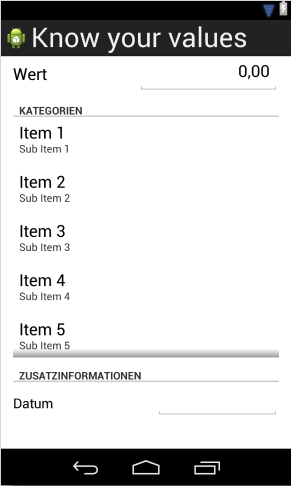
Android Studio renders layouts better in a number of key areas. In particular, list widgets such as ListView, ExpandableListView, and similar controls are displayed at all. That is one of the reasons why, up to now, I have only used designers for rough layout work. The details were then handled in XML and reviewed on a test device. Android Studio has the potential to change that.
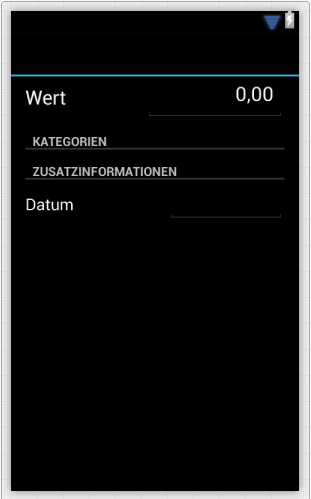
Xamarin's designer does not display the ListView widget.
Google's Android Studio does.
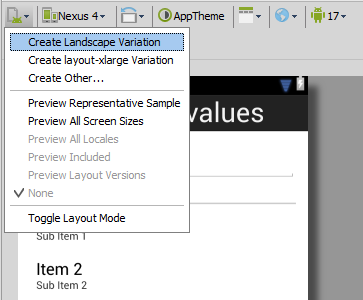
Configuration for other orientations and sizes
As a rule, UI layouts are designed for a particular orientation, horizontal or vertical, or for a specific device class such as smartphone or tablet. Android already makes it quite easy to provide your UI for different requirements. Still, having this feature directly in Android Studio is useful because it saves developers simple, repetitive steps. You stay focused on your UI and can make the desired changes right from the original layout. It may not stand out as much as the next feature, but it will certainly be useful regularly, especially when starting a completely new app.
Component Tree
This is the feature that most convinced me to add Android Studio to my current tooling. No other software currently offers the ability to point out potential problems with the widgets being used and also provide recommendations for solving them.
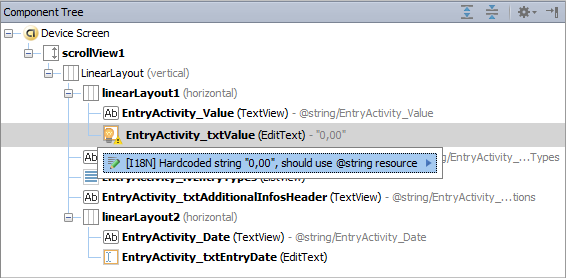
The screenshot shows what such a suggestion can look like in a simple case. This feature is especially well suited to topics such as localization and using the correct units of measurement, but not only to those.
Conclusion
The Android Studio designer offers a broad range of functionality and some genuine innovations that raise the bar a little for other designer products. It remains to be seen what other improvements will arrive before it leaves early access preview. One thing is clear, though: pioneers such as Xamarin's Android designer or Eclipse will have to catch up if they want to continue competing for developers' attention.
Sebastian Seidel
As a mobile enthusiast and managing director of Cayas Software GmbH, it is very important to me to support my team and our customers in discovering new potential and growing together. Here I mainly write about the development of Android and iOS apps with Xamarin and .NET MAUI.